
I tried out Luxtorpeda with Quake III Arena, and it worked very well!
In yesterday’s blog post on my five years of daily driving Linux Mint, in which I talked about (among other things) using Protontricks to get a Steam game called Puzzler World to run, I mentioned a couple times that I needed to try out something else with Steam called Luxtorpeda. This is, as I explained in said post, a helper of sorts for running certain Windows-only Steam games using native Linux versions of their engines in order to reap some performance gains and/or hopefully resolve some quirks and/or just get the game running on a native Linux engine, so that it doesn’t have to use Proton (well, mostly native Linux, a few supported games still run via Proton). The Luxtorpeda site has a database of games that it supports and engines it supports it with, and one of those supported games is Quake III Arena.
I’m sure some of you are aware of id Software’s Quake series of first-person shooters, and this particular 1999 instalment’s arena shooter focus (although mainly a multiplayer game, it has a single player mode that I enjoy playing). I won’t talk much about its gameplay here, since it will be familiar to any of you who have played literally any other multiplayer FPS over the past 30-odd years! I will say, though, in my view, it and Unreal Tournament (which I’ve also played, both UT1998 and UT2004) are both pure in a way most modern shooters aren’t (not with your loot boxes and all that, don’t know how else to explain it), so Quake III Arena’s one of my go-tos for when I want to play a shooting game somewhat mindlessly (I haven’t played Unreal Tournament in a while; I should get back into it)!
The engine it was made with, id Tech 3, was later open-sourced, and, of course, where there’s a notable open-source game engine, there’s likely to be a number of forks (independent continuations, essentially) of said engine, and id Tech 3 is no exception, with ioquake3 being especially noteworthy, and still maintained and used too. I’ve played OpenArena before (on both Linux and Windows before I switched), and that is essentially a version of Quake III Arena but (1) made and maintained with ioquake3 instead of the original engine and (2) with different assets (levels, characters, music et cetera) so as not to violate id Software’s existing copyright(s) on Quake III Arena’s assets. So, yeah, let’s just say Quake III Arena and its engine are kind of a big deal!
I had the game in my Steam library for quite a long time now, long enough for me to have played it plenty while still on Windows, and I’ve played it after I’ve switched too, and it plays quite well on both Windows and Linux. In fact, Quake III Arena actually did get an official Linux release back in the day! Thing is, that’s not what you get when you install Quake III Arena via Steam on Linux, for only the Windows version of the game was put up on Steam (to my knowledge, it was always like this, but if I need to be corrected feel free to do so). Therefore, running the game on Steam means running it through Proton, and although, for me at least, it works well enough for me to play, I did have a few issues with the game. For one thing, I can’t run the game in windowed mode (something I sometimes want to do in certain cases), and every time I select a stage in the single player campaign and press the FIGHT button, it, for some reason, skips the difficulty selection screen and goes straight into shooting action. Also, I seem to have trouble playing the intro and tier cinematics when I want to select them on the Cinematics menu in the game itself. And a number of other issues I can’t seem to recall off of the top of my head right now.
This all got to a point where I felt I’d be better of playing Quake III Arena natively on Linux somehow, so I decided to uninstall it on my laptop for now until I found a solution. Well, now I’ve found a solution, and that solution, as I’ve mentioned before, is Luxtorpeda. I discovered it around the same time I was looking up how to get Puzzler World to work on Linux, after which I found out I’d need Protontricks for it. In fact, I found out about it after I did a bit more digging on Protontricks and somehow found out about Luxtorpeda (I don’t quite remember how, but it must have been from one link to another or something like that). I kept Luxtorpeda in the bucket list for a while, since I was still trying to get Puzzler World to work (among other things; I’m a busy man, you see!), but after I published the Mint switch 5th anniversary post yesterday, I figured Well, I might as well give that Luxtorpeda thing a try, so I did!
Installing it and getting it to work through Steam is dead simple. Really, all you need to do is download the latest release from Codeberg, extract it into a compatibilitytools.d directory on your system (either /home/<insert_username_here>/.local/share/Steam/compatibilitytools.d/ or /home/<insert_username_here>/.steam/root/compatibilitytools.d/; if it doesn’t exist, create it) and restart Steam. When you go to a supported game’s Compatibility settings/properties to Force the use of a specific Steam Play compatibility tool and open the drop-down menu, Luxtorpeda will show up just like that! Seriously, it’s all here in the Installation (using tarball) section!
With something as easy as that, it wouldn’t’ve been right for me to hold it off any longer now, right? So I didn’t!
After I installed Luxtorpeda and selected it as my tool for running Quake III Arena, and went to run the game for the first time in what felt like ages, I came across a neat little window (made with Godot!) showing me the options I have for which engine I want to use to run the game. Naturally, I went with ioquake3 first, and lo and behold, the issues I had before went away and I was back to fragging!
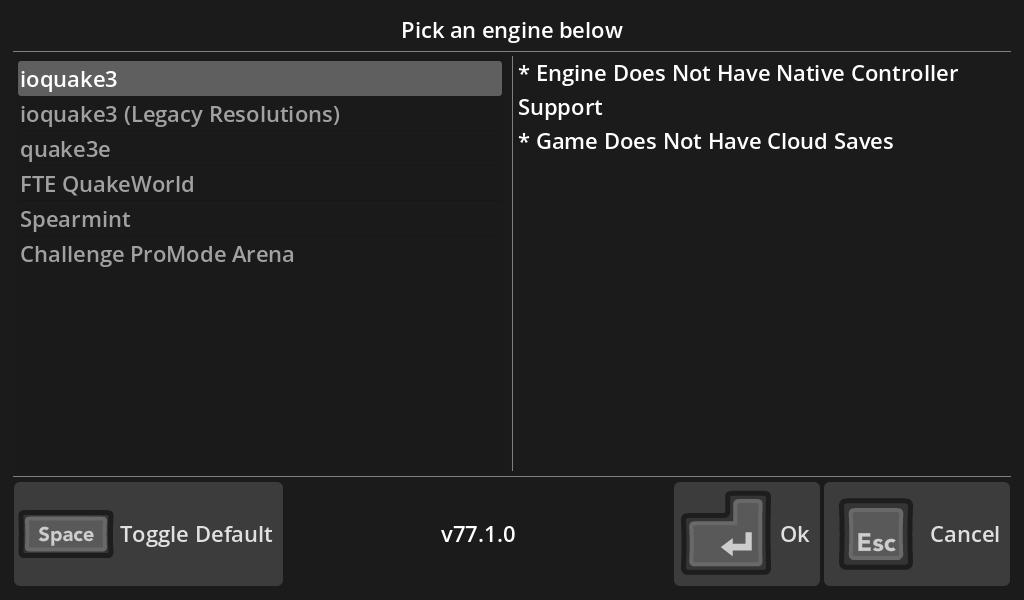
If you have a look at the above image, you’ll see that it mentions a couple of things:
- Whether or not the engine supports controllers out-of-the-box.
- Whether or not the engine supports cloud saves (since Quake III Arena uses Steam Cloud for cloud saves).
I haven’t fully verified whether or not cloud saves really don’t work with Luxtorpeda, and even if they don’t I personally won’t consider it a dealbreaker at all (feel free to try it out yourself and see if cloud saves really are trouble here, I’d like to see what happens in your case). What interested me more was the controller support. I have an Xbox One controller/gamepad which I like to use with Steam games that support it (I don’t have the console, I bought the gamepad separately). It works well on Linux, although the out-of-the-box mapping, on my system at least, was not strictly lining up with the buttons on my gamepad, which causes issues whenever I tried to play games with it. Steam, at least, comes with a handy configuration tool you can use to manually reset the mapping of your connected controller (in the Steam client, go to Steam (top-left corner), then Settings, then Controller, then click on Details for the connected controller, then Begin Test, then either Reset Device Inputs or Setup Device Inputs), so that’s what I did, and it resolved all of the issues I had with all of the Steam games I was using it for. It also forced this new remapping on every single Steam game with gampad support, so I was rather curious to see what sort of changes this would make with running Quake III Arena through Luxtorpeda.
The first thing I noticed was when I ran Luxtorpeda itself, and was somehow able to use Luxtorpeda itself with my gamepad using Steam’s own controller mapping/binding for games that use chiefly use WASD and the mouse for gameplay (which is basically what Quake III Arena does). I went to launch the game and, lo and behold, it still worked! Granted, I always play Quake III Arena with a mouse and keyboard, so the experience of playing it with a gamepad was, shall we say, not the smoothest switch (heck, my switch from Windows 10 to Linux Mint felt much smoother than this!), so I suspect that it will take time for me to get used to playing this game with a gamepad, so I guess I’ll mostly stick with mouse and keyboard for now, but hey, I got it to work with a gamepad somehow, and that was apparently meant to be impossible!
Some of the engines Luxtorpeda uses to run supported games do support controllers out-of-the-box and/or with manual setting via Steam, as shown below:
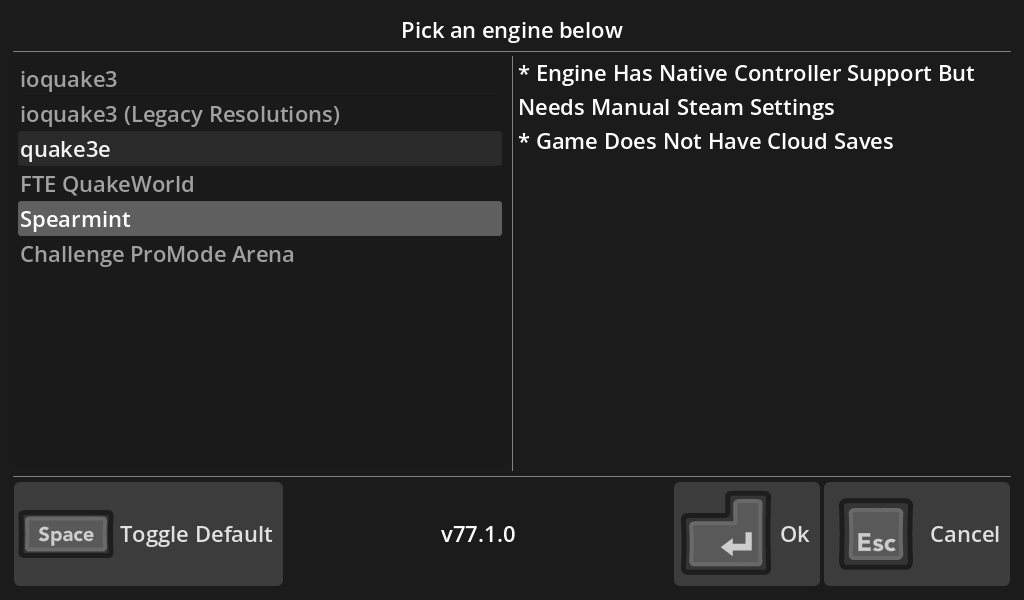
I tried Spearmint because I was keen to see if there would be any noticeable difference between running Quake III Arena with it and running the same game with ioquake3 and quake3e, since Spearmint supports controllers out-of-the-box with manual setting via Steam, according to Luxtorpeda. All three engines, of course, run the game perfectly fine with mouse and keyboard (I should know, I’ve tried all three!), but, as of now, I didn’t notice any real difference when using my gamepad with Spearmint and using it with the other two engines. I haven’t fully figured out why that is the case, or if that is even a good or bad thing. Maybe it might be to do with my forced remapping of the controller on Steam, maybe it might not. The fact of the matter is, it works, and that’s more than good enough for me!
So that’s my experience so far with Luxtorpeda, with the admittedly rather short amount of time I’ve spent on it. Of course, I’ll be spending more time with Luxtorpeda using it to run other supported titles in my Steam library, so once I feel we’re due an update on my use of it, well, given enough prodding I’ll hopefully get to that!
I must admit, it’s been years since I’ve done blog posts on consecutive days. I guess right now, the ideas and words are really coming out via the key presses on my keyboard (once again, no generative AI here in these words!), though I suppose I shall be more prepared than before to eat my words on that!
But, hey, I hope you’ve enjoyed reading this blog post as much as I’ve enjoyed writing it, and, until next time, peace!